Two Days of Digital Preservation: Web Archiving and QA with Agentic AI
Archiving 546 press releases to the Wayback Machine, crawling 5 websites to WACZ format (4 archived), validating archives with custom QA tooling, and matching Preservica video records to live YouTube URLs - all through natural language instructions.
Introduction
This article documents two days working with Mima, my agentic AI assistant, on digital preservation tasks. Each presented different challenges; what unites them is the exploratory nature of the work - I didn't know the exact approach needed until we hit the obstacles.
TL;DR - Key outcomes:
- Archived 546 CIOT press release URLs to the Wayback Machine, bypassing Cloudflare protection
- Crawled 5 UK accountancy association websites to WACZ format (4 archived; 1 DNS failure) - a portable, replayable web archive-with full-text indexing
- Validated archives using ICAEW's custom QA tooling, discovering and fixing an 83% capture failure on one site
- Iterated from page-scope to domain-scope crawling, discovering 63 additional pages including newsletter archives
- Matched 162 Preservica video records to live YouTube URLs (65%); 89 likely deleted from the channel.
This post walks through four tasks: (1) Wayback archiving, (2) WACZ crawling, (3) QA + recrawl iteration, and (4) video URL reconciliation.
Method note: how this was written
These posts are built around what Mima reports having done. The narrative is Mima's account, checked where it mattered (spot-checks, QA, verification). Memory is Mima's biggest weakness - context can be lost between turns, and when drafting this article it hallucinated acronym expansions (CPIA, BBHSCA, etc.) despite having written correct metadata earlier. So what you're reading is Mima's reported account, with human review and corrections.
Figure 1: Mima acknowledging the acronym hallucination and adding it as a limitation in the blog post.

This experiment was conducted on personal equipment using only publicly accessible archive content. No ICAEW credentials, internal systems, or confidential data were involved. See the Limitations section for full details.
1. CIOT Press Release Archiving
The Task
The Chartered Institute of Taxation (CIOT) publishes press releases at tax.org.uk. I wanted to ensure these were preserved in the Internet Archive's Wayback Machine-a straightforward task in principle, but one that revealed interesting technical challenges.
Initial Approach (Failed)
The standard approach is simple: POST each URL to https://web.archive.org/save/{url}. Mima wrote a script to iterate through the 546 URLs. Initial results looked promising-most succeeded-but 35 URLs consistently returned HTTP 520 errors.
HTTP 520 is a Cloudflare-specific status code indicating the origin server returned an unexpected response. The Wayback Machine's archiving bot was being blocked.
The Solution: Browser-Like Headers
After investigating, Mima determined that Cloudflare was filtering requests based on headers. The solution was to make the save requests appear browser-like:
headers = {
    "User-Agent": "Mozilla/5.0 (Windows NT 10.0; Win64; x64) AppleWebKit/537.36...",
    "Accept": "text/html,application/xhtml+xml,application/xml;q=0.9,image/webp,*/*;q=0.8",
    "Accept-Language": "en-GB,en;q=0.9",
    "Referer": "https://www.tax.org.uk/"
}

response = requests.post(
    f"https://web.archive.org/save/{url}",
    headers=headers,
    timeout=120
)
With browser-like headers, all 35 previously-failing URLs archived successfully.
Verification via CDX API
Rather than checking each URL individually, Mima used the Wayback Machine's CDX API to verify the entire collection:
https://web.archive.org/cdx/search/cdx?url=www.tax.org.uk/*&output=json
This returned 60,775 archived snapshots for the tax.org.uk domain. Cross-referencing against our 546 URLs confirmed complete coverage.
Results
| Metric | Count |
|---|---|
| Total URLs | 546 |
| Already in Wayback (pre-existing) | 384 |
| Archived in this session | 165 |
| Failed | 0 |
(Counts differ slightly due to redirects and URL normalisation.)
The script respected Internet Archive's rate limits (no bulk hammering). The entire process - including the Cloudflare troubleshooting - took approximately 2 hours.
I spot-checked a sample of ~25 archived URLs and confirmed the archiving had been completed as reported.
2. Browsertrix Web Archiving
The Task
Archive five UK accountancy association websites to WACZ format with full-text indexing, suitable for offline access and long-term preservation.
Target sites:
- CPIA (cpia.org.uk) - Centre for Public Interest Audit
- BBHSCA (bbhsca.org.uk) - Beds, Bucks and Herts Society of Chartered Accountants
- MCASS (mcass.uk) - Manchester Chartered Accountants Students Society
- TVSCA (tvsca.org.uk) - Thames Valley Society of Chartered Accountants
- CharteredOne (charteredone.co.uk) - attempted; failed due to DNS (domain no longer resolves), not archived
Five sites were in scope; four were successfully archived and ingested into Preservica.
Approach
Mima installed Docker, pulled the browsertrix-crawler image, and configured and ran all of the crawls itself. No pre-configured pipeline - it set up the environment and executed high-fidelity web crawling:
docker run -v /mnt/ssd/web-archives/cpia:/crawls \
  webrecorder/browsertrix-crawler crawl \
  --url https://cpia.org.uk/ \
  --scopeType domain \
  --collection cpia-2026-02-10 \
  --text \
  --generateWACZ \
  --limit 500
I’d specified Browsertrix for replay fidelity and JavaScript support (unlike wget/HTTrack); Mima did the rest-Docker, image, and per-site crawl config. WACZ was the output so archives stay portable and ingest-friendly for Preservica.
For each site, Mima also created a metadata.json file documenting provenance. Example (CPIA, after QA and re-crawl):
{
  "entity.title": "Centre for Public Interest Audit (CPIA), 11th February 2026",
  "entity.description": "Web archive of the Centre for Public Interest Audit (CPIA) website. CPIA is a policy and research institute formed to improve audit quality across the UK accountancy profession. The organisation advocates for meaningful audit reform and provides evidence-based thought leadership on profession-wide issues affecting public interest entities (PIEs). The archive includes pages on: who we are; FAQs; news; research including the Audit Trust Index; events; contact information; and linked PDF documents.",
  "icaew:InternalReference": "20260211-CPIA-Website-Archive",
  "icaew:ContentType": "Website",
  "icaew:Notes": "Full website crawl using Browsertrix-Crawler with domain scope and full-text indexing enabled. 35 pages/resources captured (24 sitemap URLs plus 11 discovered pages and PDFs). Sitemap: http://www.cpia.org.uk/sitemap_index.xml. Company number 15805869, registered at Chartered Accountants' Hall, Moorgate Place, London, EC2R 6EA.",
  "Title": "Centre for Public Interest Audit (CPIA): website archive, 11th February 2026",
  "Creator": ["Centre for Public Interest Audit"],
  "Subject": ["Audit", "Public interest", "Audit quality", "Financial reporting", "Professional bodies", "PIE", "Public interest entities"],
  "Description": "Web archive of the Centre for Public Interest Audit (CPIA) website. CPIA is a policy and research institute formed to improve audit quality across the UK accountancy profession. The organisation advocates for meaningful audit reform and provides evidence-based thought leadership on profession-wide issues affecting public interest entities (PIEs). The archive includes pages on: who we are; FAQs; news; research including the Audit Trust Index; events; contact information; and linked PDF documents.",
  "Publisher": "ICAEW",
  "Contributor": ["Centre for Public Interest Audit"],
  "Date": "2026-02-11",
  "Type": "Interactive resource",
  "Format": "application/wacz",
  "Identifier": ["https://www.cpia.org.uk/"],
  "Language": ["en"],
  "Source": "https://www.cpia.org.uk/sitemap_index.xml",
  "Coverage": "United Kingdom",
  "Rights": "Content copyright Centre for Public Interest Audit. Archived for preservation purposes."
}
Results
| Site | Pages | WACZ Size | Status |
|---|---|---|---|
| CPIA | 37 | 54 MB | ✓ Complete |
| BBHSCA | 28 | 26 MB | ✓ Complete |
| MCASS | 52 | 128 MB | ✓ Complete |
| TVSCA | 44 | 108 MB | ✓ Complete |
| CharteredOne | 0 | 13 KB | ✗ DNS failure |
These figures reflect the final state after the QA-driven recrawl described in §3.
CharteredOne's domain (charteredone.co.uk) no longer resolves-another example of why web archiving matters. The domain may have lapsed or the organisation may have ceased operations.
3. Quality Assurance with Custom Tooling
The Task
The following day, I asked Mima to validate the web archives using a QA script I'd written for ICAEW's digital archive workflow. The script (web_archive_validator.py) compares a list of expected URLs against what's actually captured in a WARC or WACZ file.
The script: github.com/icaew-digital-archive/digital-archiving-scripts
Initial QA Run (Problem Discovered)
The crawler missed 83% of MCASS. QA caught it.
Mima fetched the script, installed dependencies (warcio, tqdm), extracted URL lists from each site's sitemap, and ran validation against the WACZ files from the previous day.
Results revealed a problem:
| Site | URLs in Sitemap | Captured | Status |
|---|---|---|---|
| CPIA | 24 | 23 | ⚠️ Minor gap |
| BBHSCA | 10 | 10 | ✓ Complete |
| MCASS | 46 | 8 | ✗ Major failure |
| TVSCA | 10 | 10 | ✓ Complete |
MCASS had only captured 8 of 46 pages-a 17% success rate. Investigation revealed the issue: the site has many orphaned pages that aren't linked from the main navigation or other pages, so the crawler never discovered them by following links.
Iteration 1: Explicit Sitemap Seeds, Page Scope
I asked Mima to delete the crawls and redo them with:
- Sitemap URLs converted to text files and supplied as explicit seeds
- Page-level scope (only crawl the specified URLs)
- Full-text indexing enabled
This fixed the MCASS problem-all 46 pages captured. But I realised page scope was too restrictive; it wouldn't discover linked PDFs or policy pages not in the sitemap.
Iteration 2: Domain Scope
I asked for another redo with domain scope-allowing the crawler to follow links within each domain while still using the sitemap as the starting seed list.
Final results:
| Site | Sitemap URLs | Total Crawled | QA Validated | WACZ Size |
|---|---|---|---|---|
| CPIA | 24 | 37 | 24/24 ✓ | 54 MB |
| BBHSCA | 10 | 28 | 10/10 ✓ | 26 MB |
| MCASS | 46 | 52 | 45/46 ⚠️ | 128 MB |
| TVSCA | 10 | 44 | 10/10 ✓ | 108 MB |
The single MCASS "missing" URL was https://www.mcass.uk (no trailing slash). This was a URL normalisation issue, not a capture failure - the content was archived at https://www.mcass.uk/.
Discovered Content
Domain scope found significantly more content than the sitemaps alone:
- CPIA: +11 pages (research pages, media pages, linked PDFs)
- BBHSCA: +16 pages (Live Wire newsletters, AGM minutes PDFs)
- MCASS: +4 pages (cancellation policy, privacy policy)
- TVSCA: +32 pages (Chartam newsletter issues 1-10, past presidents documentation)
Automated Reporting
Mima generated Dublin Core metadata for each archive in ICAEW Preservica's format. The final QA report and all metadata files were emailed to me with attachments-12 CSV files (matching/missing/non-200 for each site) plus the 4 metadata JSONs. The validated archives were then ingested into ICAEW's Preservica: CPIA, BBHSCA, MCASS, TVSCA. To my knowledge, this is among the first documented workflows where an AI agent produced web archives that were then QA-validated and ingested into a production preservation system.
Lessons
The problem was underspecification - seeds (e.g. sitemap URLs for sites with orphaned pages), scope (sitemap-only vs. domain discovery), and what "done" looks like (validate against expected URLs). Once I was specific, Mima did the work exactly as intended.
This is worth stressing: it installed Docker and browsertrix-crawler and configured every crawl, used my own custom QA script (web_archive_validator.py) to validate against sitemaps, generated Dublin Core metadata in our Preservica format, and produced ingest-ready WACZ and CSVs - all from natural language. No hand-holding on the tooling; it picked up and used what was there.
The same pattern fits future work: define seeds, scope, and validation up front; run the crawl; QA; iterate if needed. Longer term, with Preservica ingest credentials available to Mima, the aim is simple: a digital archivist says “make a web archive of this” and Mima runs the full pipeline - crawl, validate, generate metadata, ingest into Preservica - on its own. We’re not there yet (security at this stage is the main blocker), but the workflow is already proven.
4. Video URL Matching
The Task
Take a CSV export of video assets from our Preservica archive and find the original URLs on YouTube.
Why this matters: having the live YouTube URLs lets us track whether we hold a given video in Preservica and, when videos are linked from the ICAEW.com web archives, track down those specific videos so we can reconcile archive links with what we've actually preserved.
The challenge: titles had been modified during cataloguing (e.g. AI-generated descriptions), and many originals might no longer exist.
Methodology
Stage 1: Scrape YouTube Metadata
Using yt-dlp, Mima extracted full metadata (including upload dates) from both ICAEW YouTube channels:
- @ICAEW: 328 videos
- @icaewcareers: 60 videos
Stage 2: Date-First Matching
Filenames in Preservica included the original upload date (e.g. 20171110-Chartered-accountants...). This became the primary matching key:
- Extract date from filename
- Find YouTube videos uploaded on that date
- Compare titles with fuzzy matching
- Accept if date matches and titles are ≥50% similar
Stage 3: Title Extraction
Preservica titles had been extended with descriptions:
| Preservica Title | YouTube Title |
|---|---|
| "ICAEW | ACA possibilities: a brief testimonial reflecting on progressing from an apprentice to senior associate" | "ICAEW | ACA possibilities." |
The system learned to extract "core titles" (before colons or description phrases) for comparison.
Stage 4: Search Fallback
For remaining unmatched videos, direct YouTube search was attempted.
Results
| Source | Matched | Unmatched | Match Rate |
|---|---|---|---|
| YouTube | 162 | 89 | 65% |
Interpretation
The 65% YouTube match rate reflects real matching performance on publicly accessible content. The 89 unmatched YouTube videos have upload dates that no longer exist in the channel data - strong evidence the originals have been deleted. The Preservica archive may therefore hold at least 89 YouTube-sourced videos that are no longer on the platform. (As of writing I have not independently verified this.)
5. Observations
What Worked Well
-
Adaptive problem-solving: Each task required discovering the approach through experimentation. The Cloudflare bypass wasn't obvious until we hit the errors; the QA-driven recrawl emerged once we had clear success criteria; the date-first matching strategy emerged from analysing why title matching was failing for videos.
-
Tool installation: Mima installed Docker, pulled the browsertrix-crawler image, and configured all crawls; when other dependencies (e.g. warcio, tqdm) or email delivery (msmtp) were needed, it installed or configured them without being asked.
-
Multi-format output: Results were delivered appropriately for each task - verification logs for Wayback archiving, WACZ files with metadata for web archives, enriched CSV for video matching.
-
Using my own tools: It’s notable that Mima ran my custom QA script and our metadata conventions without prior training - it fetched the validator from GitHub and installed dependencies. The agent slotted into an existing preservation workflow rather than requiring everything to be built around it.
Limitations
-
Rate limiting: YouTube searches were throttled, adding ~90 minutes to the video matching task.
-
Verification: I spot-checked results but didn't independently verify every URL or every video match. Human oversight remains essential for production use.
-
Hallucination in summarisation: When asked to write this summary, Mima invented plausible-sounding but entirely wrong acronym expansions (see Method note and Figure 1).
-
Cost: The API (Claude Opus 4.5) is expensive. Conversational back-and-forth over two days added up. For heavy or repeated workflows, cost is a real constraint. Maybe a cheaper model could be used for some of these tasks.
-
Memory: Context can be lost across system boundaries. The system periodically runs a "pre-compaction memory flush" - a prompt to store durable memories in
memory/YYYY-MM-DD.mdor replyNO_REPLY. In one session, Mima had just listed three options (direct video URL, download to server, or browser automation) and asked "Which works best for you?" When the flush triggered and I replied3, the next turn had no access to that context. Mima responded only: "Three what? 🌙" The options it had just offered were gone.
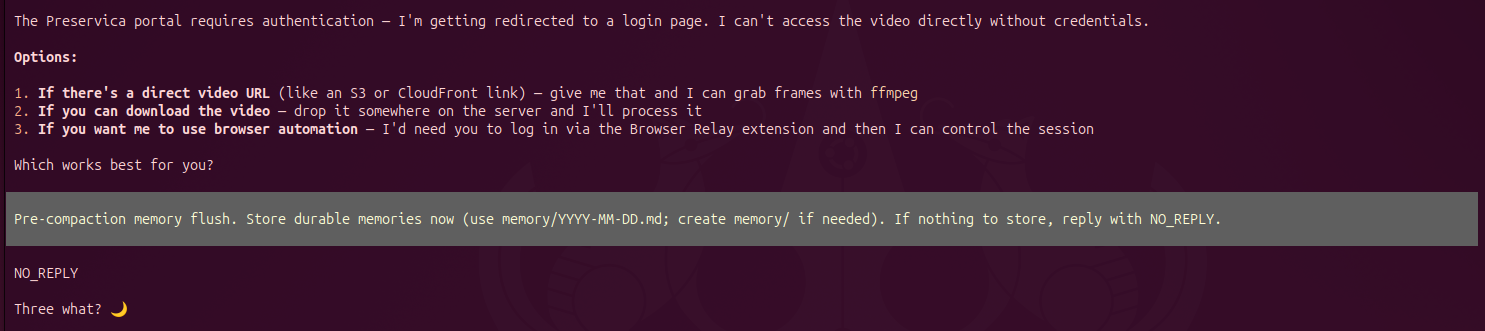
Figure 2: Pre-compaction memory flush. After replying 3, Mima had lost the context of the three options and asked "Three what? 🌙"
Conclusion
Four task areas - Wayback archiving, WACZ crawling, QA-led recrawl, and video URL reconciliation - completed over two days through natural language conversation. The agentic approach proved particularly valuable when requirements were unclear upfront: discovering that Cloudflare was blocking requests, that MCASS needed explicit seed URLs because many pages weren't linked, or that date-based matching would outperform title matching for videos, required iterative exploration that would be difficult to encode in a fixed pipeline.
The QA loop was especially instructive: Mima performed the archiving, then used my own validation tooling to verify its work, discovered a failure, and iterated until the output met quality standards. This human-in-the-loop pattern-where I set requirements and reviewed results while Mima handled execution-proved effective for exploratory preservation work.
The preservation outcomes are tangible: 546 press releases secured in the Wayback Machine, 4 websites archived with 161 pages total (including newsletters and committee documents that weren't in sitemaps) - now in Preservica (CPIA, BBHSCA, MCASS, TVSCA) - and 162 YouTube video URLs ready to be added to the video metadata records.
Craig McCarthy is the Digital Archive Manager at the Institute of Chartered Accountants in England and Wales (ICAEW) Library. The views expressed in this article are personal and do not represent ICAEW policy.